
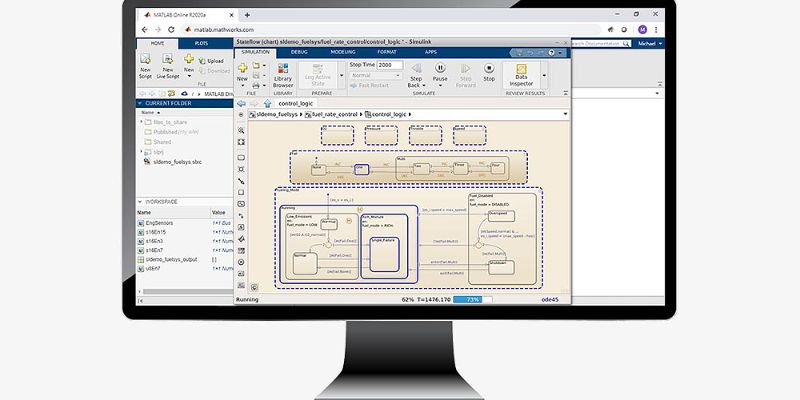
The way researchers, engineers, and students work on technical projects and simulations is being drastically altered by technology. These days, users can access sophisticated software straight from a web browser without having to install large programs on their computers thanks to cloud-based platforms. MATLAB Online is among the best illustrations of this innovation. MATLAB Online, created by MathWorks, allows users to conduct mathematical modeling, coding, data analysis, and simulations from any location with an internet connection.
Professionals who require remote access to their projects and students seeking a straightforward setup process will find this platform especially helpful. FITA Academy empowers learners to develop analytical computing, simulation, programming, and data visualization skills aligned with real-world MATLAB industry requirements. Users can concentrate solely on creating simulations and evaluating outcomes rather than worrying about software compatibility or storage constraints. MATLAB Online provides a useful and effective environment for working on engineering models, signal processing, machine learning, or automation systems. Modern users can greatly increase productivity and streamline technical workflows by learning how to use this cloud-based tool.
Understanding MATLAB Online and Its Features
Without installing desktop software, users can access simulation tools and programming features with MATLAB Online, the browser-based version of the program. Matrix operations, graphical plotting, algorithm development, and simulation modeling are just a few of the features that are present in the conventional version. Accessibility is one of MATLAB Online’s main benefits. Users can log in from a variety of devices, including tablets, laptops, and even small systems that might not be able to handle large software installations.
Automatic cloud storage is another helpful feature that enables users to safely store and access projects at any time. Additionally, MATLAB Online integrates with Simulink, allowing users to use blocks and diagrams to visually create simulation models. Researchers and engineering students who work on mechanical simulations, robotics, electrical systems, and control systems will find this functionality useful. Additionally, the platform facilitates teamwork by enabling remote collaboration and project sharing. Because of these characteristics, MATLAB Online is a dependable and adaptable option for academic institutions, research settings, and business professionals.
System Requirements and Accessing MATLAB Online
Compared to the desktop version, MATLAB Online has fewer system requirements, which is one of its most appealing features. Users do not require powerful hardware configurations or a lot of storage space because the software runs directly through a web browser. To start using the platform, you typically need a MathWorks account, a modern browser like Google Chrome or Microsoft Edge, and a reliable internet connection. For students using shared systems or standard laptops, this configuration makes MATLAB Online extremely convenient. Users only need to go to the official MathWorks website and enter their login information to access the service.
They can immediately start MATLAB Online from the dashboard after logging in. MATLAB Online automatically runs the most recent version that is available on the cloud, in contrast to traditional software installations that might need updates and compatibility checks. This feature guarantees that users always have access to the most recent tools and features while also saving time. Users can thus begin simulations more quickly and concentrate more on project development and hands-on learning. Matlab Training In Chennai offering practical, industry-focused guidance in programming, data analysis, simulation, algorithm development, and engineering application design.
Creating a MathWorks Account and Launching MATLAB Online
It only takes a few minutes to get started with MATLAB Online. Initially, users must register on the MathWorks website with their email address and professional or academic information. While professionals may use individual or enterprise subscriptions, students can typically access MATLAB Online through university licenses. Users can choose the MATLAB Online option from the main dashboard after registering and logging into their MathWorks account. The MATLAB environment, which includes the command window, workspace, editor, and file management sections, is then launched by the browser.
Similar to the desktop version, users can upload datasets, create scripts, and arrange folders. Because it makes navigation easier and lowers the learning curve, beginners frequently value the clean interface. Additionally, MATLAB Online offers documentation, tutorials, and examples that aid novice users in comprehending commands and simulation methods. Users can start experimenting with coding, mathematical analysis, and simulation projects as soon as the platform is ready.
Running Simulations Using MATLAB and Simulink Online
One of MATLAB Online’s most potent uses is for simulations. MATLAB and Simulink Online enable users to efficiently create mathematical models, visualize results, and analyze system behavior. In order to start a simulation, users usually create models with connected blocks using Simulink’s graphical environment or write scripts. For instance, an engineering student can use Simulink to connect input signals, controllers, and output displays to simulate a motor control system. Users can run the simulation and see real-time graphical results after setting up the parameters. Matlab Training Institute in Chennai focuses on hands-on, industry-oriented learning to help learners master programming, simulation, data analysis, and mathematical modeling.
Additionally, MATLAB Online enables users to store simulation files directly to cloud storage, which facilitates future changes. These simulation tools are used by many industries to test designs prior to their implementation in real-world settings. This procedure lowers expenses, lowers risks, and increases performance accuracy. The ability to quickly change variables and repeat experiments without restarting the entire setup is another significant advantage. Because of these features, MATLAB Online is very useful for research, engineering experiments, and academic projects.
Essential MATLAB Commands and Tools for Beginners
The fundamental commands and tools that make simulation work easier should be understood by novices using MATLAB Online. With MATLAB’s command-based structure, users can create variables, perform calculations, and create graphs with straightforward syntax. Simulations and data analysis frequently make use of commands like clc, clear, and plot. While the editor enables users to write reusable scripts and functions, the workspace section assists users in keeping an eye on variables and outputs. Additionally, MATLAB Online offers toolboxes that expand functionality in fields such as signal analysis, robotics, image processing, and machine learning.
Simulink offers drag-and-drop components for simulation tasks, removing the need for intricate coding. To gain a visual understanding of simulation concepts, novices can experiment with blocks that represent sensors, controllers, and dynamic systems. The integrated help documentation, which provides examples and syntax guidance for commands, is another helpful feature. Users can boost their confidence and finish simulation projects more successfully by gradually learning these fundamental tools. Regular practice also aids users in comprehending analytical workflows and problem-solving strategies.
Data Visualization and Model Analysis in MATLAB Online
Because it makes it easier for users to understand results and make wise decisions, data visualization is crucial in simulations. Several robust plotting and graphing tools in MATLAB Online convert unprocessed data into insightful visual outputs. To examine trends and system performance, users can produce line graphs, bar charts, 3D models, and animated plots. For instance, a student of mechanical engineering can examine system stability by simulating vibration patterns and displaying displacement graphs. These are the uses of MATLAB. Real-time visualization is another feature of MATLAB Online that lets users keep an eye on variables as they change throughout simulations.
For researchers working on dynamic systems or big datasets, this feature is very helpful. MATLAB offers analytical functions that compute statistical measures, error rates, and performance metrics in addition to plotting tools. These features assist users in recognizing problems and efficiently optimizing models. Presentations and project documentation are also enhanced by clear visualization because it makes difficult technical information easier to comprehend. As a result, MATLAB Online improves communication and analytical precision in simulation-based projects.
Troubleshooting Common MATLAB Online Issues
While working on simulations, users may occasionally encounter technical difficulties even though MATLAB Online provides a seamless user experience. Due to the platform’s complete reliance on cloud access, slow performance brought on by erratic internet connections is a frequent issue. By utilizing dependable networks and closing unused browser tabs, users can lessen disruptions. Browser compatibility is another problem that could impact file uploads or graphics rendering. These issues are frequently resolved quickly by updating the browser to the most recent version.
Large simulations that demand a lot of processing power can also be challenging for some users. In these situations, performance can be enhanced by streamlining models or cutting out pointless background operations. Sometimes cloud storage updates slowly, which can cause delays in file synchronization. Maintaining local backup copies aids in preventing unintentional data loss. While writing scripts, novices may also run into syntax errors, but troubleshooting is made easier by MATLAB’s debugging tools and help documentation. Users can work more confidently and consistently during simulation tasks when they are aware of these typical obstacles.
Improving Workflow and Project Management
When managing simulation projects in MATLAB Online, effective workflow management is crucial. During development, users can save time and avoid confusion by using well-organized project structures. Making distinct folders for scripts, datasets, images, and output files is one useful tactic. When working on several projects at once, having clear file names also enhances accessibility. Keyboard shortcuts that speed up coding and make platform navigation easier are supported by MATLAB Online. For instance, shortcut commands allow users to quickly run scripts, comment lines, or switch between files.
Documenting scripts with comments is another helpful technique that makes the project easier for collaborators to understand. To keep track of changes and prevent losing crucial progress, users should also save project versions on a regular basis. Because team members can access files remotely and make real-time contributions, integrating MATLAB Online with cloud storage improves collaboration. Because they can finish tasks more quickly, students working on academic projects particularly profit from these workflow enhancements. Effective project management techniques eventually boost output and lower simulation development errors.
Final Report
The way users conduct simulations, evaluate data, and create technical projects has completely changed thanks to MATLAB Online. The platform eliminates many of the conventional obstacles related to software installation and hardware constraints by offering browser-based access to sophisticated computational tools. These days, researchers, engineers, and students can work with teams virtually anywhere, create simulations, and visualize results. MATLAB Online provides an easy-to-use environment that fosters learning and creativity, from creating intricate Simulink models to creating a MathWorks account.
It is a useful tool for contemporary technical workflows because of its strong visualization capabilities, cloud storage integration, and adaptable accessibility. As their confidence increases, novices can progressively experiment with more complex simulation techniques after beginning with basic commands. Professionals can use the platform for remote collaboration and effective project management at the same time. Learning how to use MATLAB Online efficiently can offer long-term technical advantages and boost overall productivity as cloud computing continues to impact the engineering and education sectors.